Learning Guides · Study Tools · Note taking
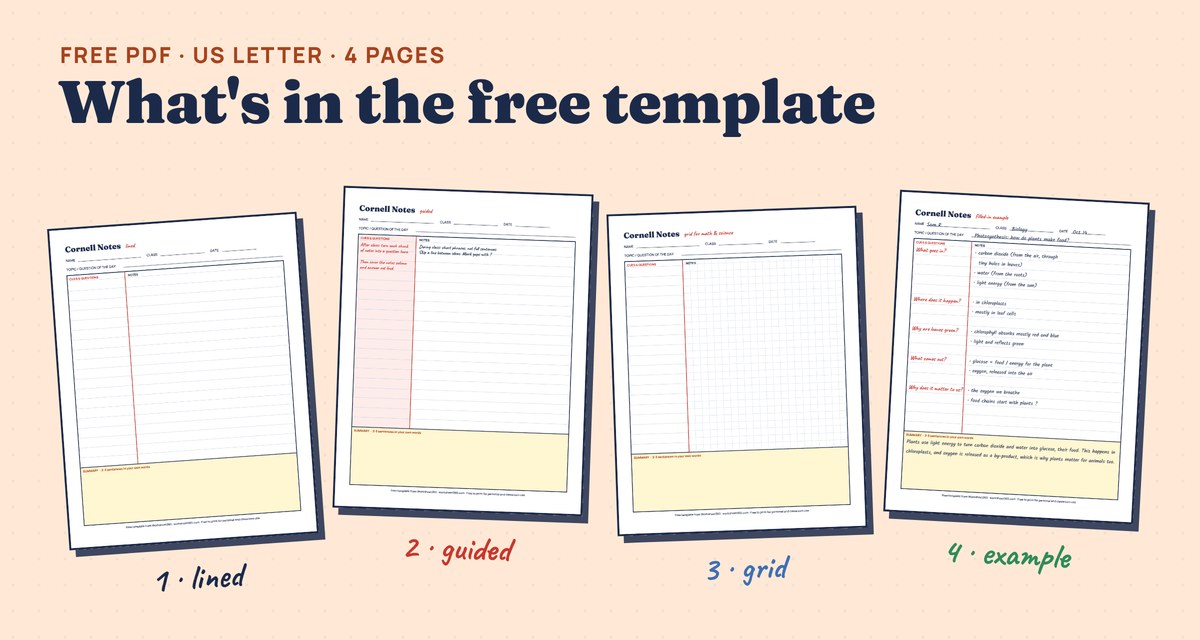
A Cornell notes template splits one page into three parts. Here is how to use it:
- Notes column (right, about 6 inches): during class, write the main ideas in short phrases.
- Cue column (left, about 2½ inches): after class, turn each chunk of notes into a question.
- Summary (bottom, about 2 inches): write two or three sentences in your own words.
- Then the step that makes it work: cover the notes, answer the questions from memory, and check.
About the links: the template and the maker on this page are free, with no sign-up. Further down we mention our own note-taking unit for teachers, sold on Teachers Pay Teachers. We make it, so we are not neutral about it. Our disclosure.
Free Cornell notes template (PDF)
Cornell notes maker Try it now
Type your notes, then print a clean Cornell page or switch to Quiz me to hide the notes and test yourself. Your draft stays in this browser only; nothing is sent.
How the page is laid out
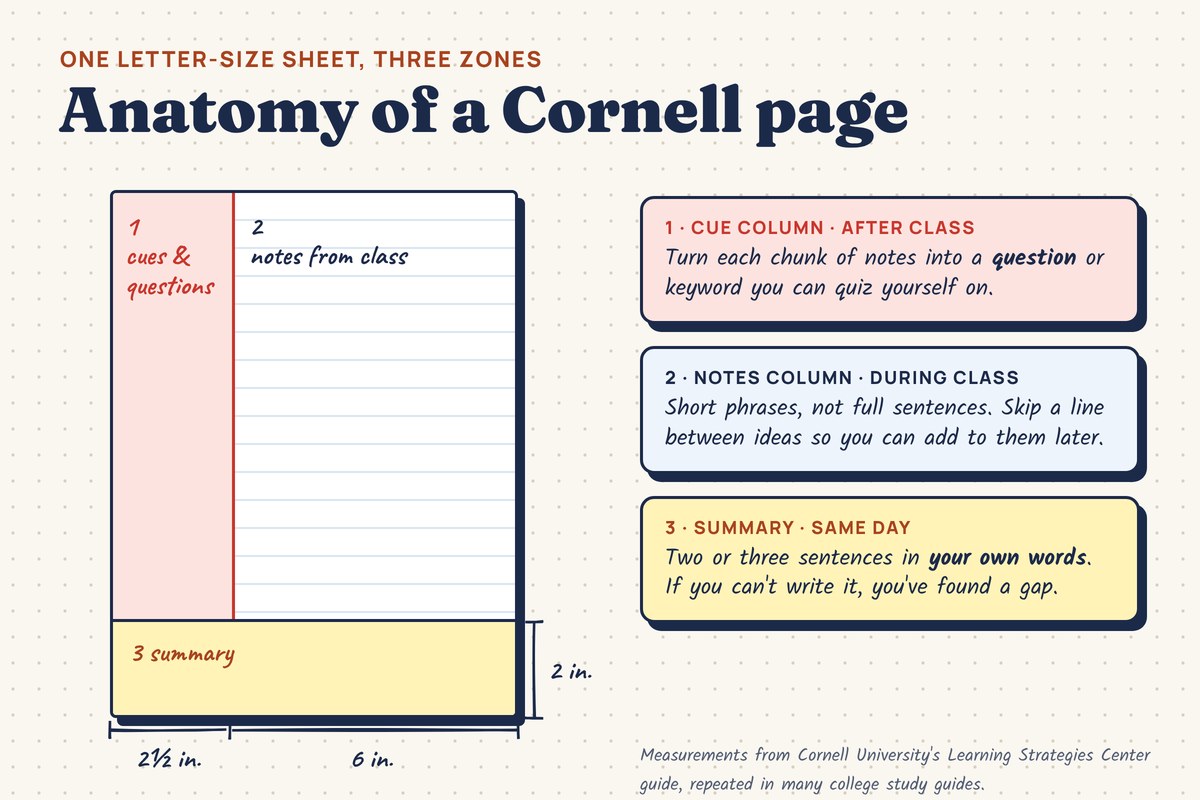
The method comes from Walter Pauk, an education professor at Cornell University, who described it in his book How to Study in College. The usual measurements, repeated in many college study guides, are a 2½-inch cue column, a 6-inch notes column and a 2-inch summary at the bottom. You do not need a ruler: a fold or a quick line works just as well.
How to take Cornell notes: the 5 R’s
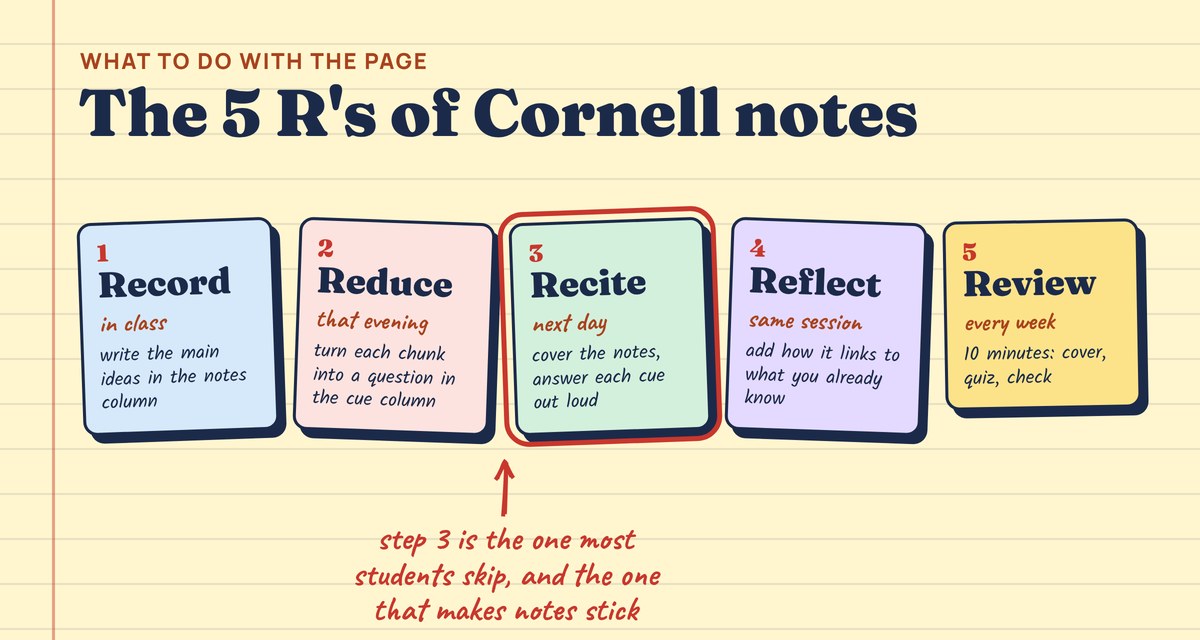
- Record. During class, write the main ideas in the notes column. Short phrases, abbreviations, arrows. Leave a blank line between ideas, and put a ? where you lost the thread.
- Reduce. The same day, read your notes and write a question for each chunk in the cue column. “What 3 things go in?” beats “Photosynthesis”.
- Recite. Cover the notes column with a sheet of paper. Read each cue and answer out loud or on scrap paper. Then uncover and check. This is the part that builds memory.
- Reflect. Add a line on how this links to something you already know, or what still confuses you. Then write the summary.
- Review. Once a week, spend ten minutes covering and quizzing yourself on older pages. Our study schedule guide shows when to bring each topic back.
Do Cornell notes work?
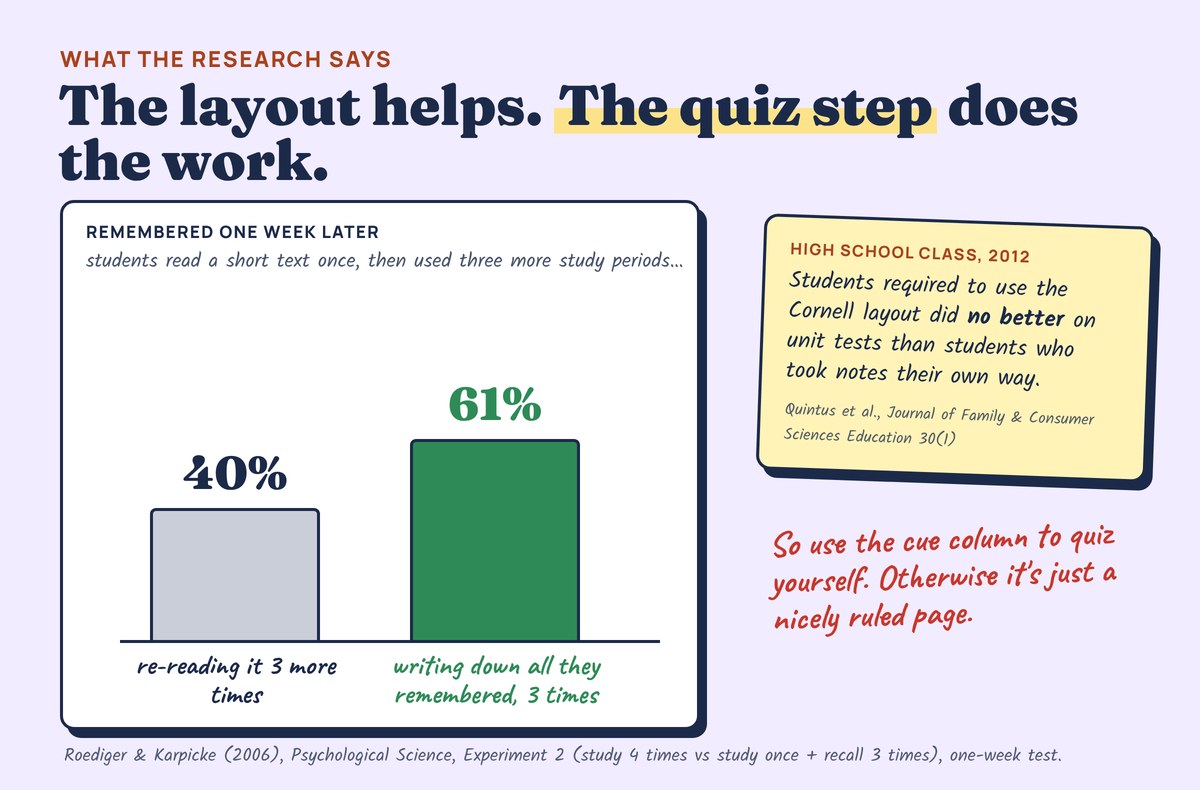
The honest answer: the layout alone is not magic, but the habit it sets up is backed by strong research.
So the rule is simple: if you never cover the notes column, you have a tidy page, not a study tool.
Good cue questions vs weak ones
| Weak cue | Better cue | Why it works |
|---|---|---|
| Photosynthesis | What 3 things does a plant need to make glucose? | Has one clear answer you can check |
| Causes of WWI | Which 4 long-term causes led to WWI, and which event set it off? | Makes you list and connect, not just recognize |
| Slope | How do I find the slope from two points? Do one example. | Forces you to do the skill, not read it |
| Theme | What is the theme of chapter 3, and which line shows it? | Asks for evidence, like the test will |
Cornell notes for math, science and reading
- Math: use the grid page. Notes column: a worked example, step by step. Cue column: “What is the first step when…?” and a new practice problem to try with the example covered.
- Science: draw the diagram in the notes column and label it. Cue: “Label the parts from memory.” Redraw it during Recite.
- History and reading: notes in time order or by chapter. Cues ask who, why and what changed. The summary is the place for the big idea in one sentence.
- On a laptop or tablet: a two-column table in any document works. The maker above prints the same layout from what you type.
★ Teaching note taking in class? For teachers
Our printable Note-Taking Skills Unit goes further than the template: why notes fail (speed), four margin marks to flag gaps, a 10-minute note repair after class, turning notes into questions, and a self-quiz tool that schedules reviews. 25 pages, grades 6-12, every number sourced.
Questions
What is a Cornell notes template?
A page divided into a narrow cue column on the left (about 2½ inches), a wide notes column on the right (about 6 inches) and a summary area at the bottom (about 2 inches). You take notes on the right, write questions on the left after class, and summarize at the bottom.
Who invented Cornell notes?
Walter Pauk, an education professor at Cornell University, developed the system in the 1950s and described it in his book How to Study in College.
Do Cornell notes actually work?
The layout alone did not raise test scores in a 2012 high school study. What works is using the cue column to quiz yourself with the notes covered: research on retrieval practice shows recalling beats rereading by a wide margin a week later.
How do I make Cornell notes in Google Docs or Word?
Insert a table with two columns, make the left one about a third as wide as the right, and add a full-width row at the bottom for the summary. Or type your notes in the maker on this page and print them.
Can I use Cornell notes for math?
Yes. Use a grid page, put worked examples in the notes column and a fresh practice problem in the cue column. Cover the example and solve the cue problem to review.
Is the template really free?
Yes. The PDF and the maker are free, with no sign-up. You can print the template for personal and classroom use.
Sources: Roediger & Karpicke (2006), Psychological Science 17(3), Experiment 2; Quintus, Borr, Duffield, Napoleon & Welch (2012), Journal of Family and Consumer Sciences Education 30(1); Cornell University Learning Strategies Center guide as reproduced by the University of Manitoba; Pauk & Owens, How to Study in College, 10th ed. (2010). Illustrations are drawn by Worksheet365. Our editorial approach · Disclosure