How to Use Paperpal for Free (We Tested It: 0% to 50% AI)
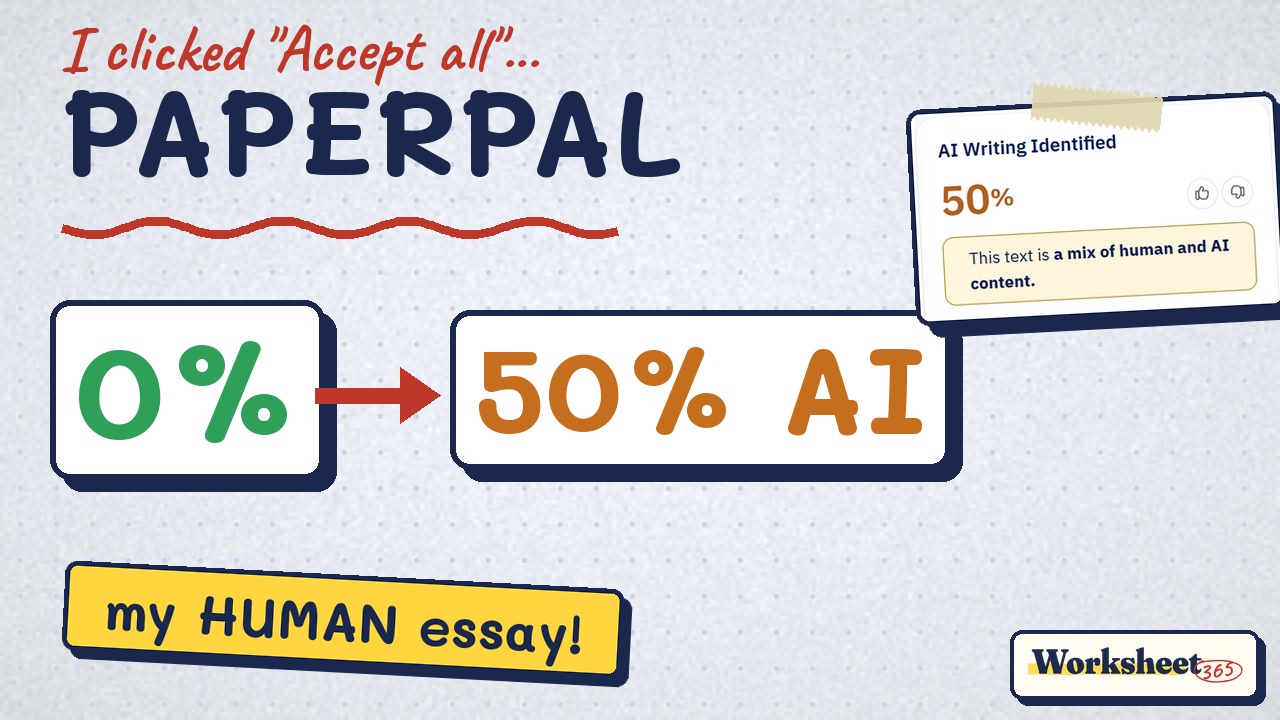
We tested Paperpal's free plan on a real student paragraph: grammar fixes, 0% plagiarism, and why "Accept all" made it look 50% AI.
Learning Guides · AI Guides · Paperpal tutorial
Paste your text, click each underlined word and read the reason before you accept it, then run the free plagiarism check. Never click Accept all on an essay you will hand in.
About the links: we tested every feature ourselves on a free account. Some links are affiliate links: if you upgrade through them, Worksheet365 may earn a commission at no extra cost to you. Code PAP20 = 20% off. Our disclosure.
Watch the full test in 3 minutes

What Paperpal is
Paperpal is an AI writing assistant for academic work. It checks grammar, runs a plagiarism check and estimates AI writing, on the web, in Word and in Google Docs. We used only the free plan, in this order:
Step 1: paste your text

Click Create New Document and paste your essay. In a few seconds every possible mistake gets a red line, and the Edit panel counts them.
Step 2: click a suggestion and read the reason

Click one underlined word. A small box says why Paperpal wants the change, with Accept and Reject. This is the habit that matters most.
Step 3: run the free plagiarism check

Open Checks in the right bar, tick Plagiarism and run it. It took about a minute. Our own paragraph scored 0%; if yours is higher, add quotation marks and a citation to each match.
Our AI detector test: 0% → 50% → 0%
Can Paperpal’s own edits make human writing look like AI? We ran its AI detector on three versions of the same paragraph.


5 rules to keep your own voice
- Never click “Accept all”on an essay you will submit. That one click took us from 0% to 50% AI.
- Accept real mistakesAgreement, verb forms, spelling, apostrophes.
- Reject rewordingsRephrase, Word Choice, Conciseness: rewrite it yourself if needed.
- Reread the end resultPaperpal changed “can’t” to “can not”. The right word is “cannot”.
- Check your school’s rulesGrammar help is usually fine, AI rewriting may not be: is using AI cheating?
Free or Prime?
Free
- 200 grammar edits a month
- Lite plagiarism report (7,000 words on our account)
- AI detection preview
- 5 paraphrases a day
Prime · $6/month (yearly)
- 20,000 grammar edits
- 10,000 plagiarism words
- 25,000 AI detection words
- 500 paraphrases a month
A few essays a month? Free is enough. Long assignments every week? Prime is worth a look; code PAP20 takes 20% off.
Our honest take
Questions
Is Paperpal free?
Yes. The free plan includes 200 grammar edits a month, a Lite plagiarism report and a limited AI detection preview. Paid plans add more words and unlimited AI detection.
Is the Paperpal plagiarism check free?
Yes, you get a Lite report on the free plan. Our free account showed 7,000 plagiarism words a month in November 2026.
Can Paperpal make my essay look AI-generated?
In our test, yes: after Accept all, Paperpal’s AI detector rated our human-written paragraph 50% AI. Accepting only real grammar fixes kept it at 0%.
Is using Paperpal cheating?
Fixing your own grammar is usually allowed. Letting a tool rewrite your sentences may break your school’s AI policy. Check your syllabus, and see is using AI cheating?
Does Paperpal work in Word and Google Docs?
Yes. Paperpal has a Microsoft Word add-in and a Chrome extension for Google Docs and Overleaf, plus the web editor we used.
How we tested: free Paperpal account, web editor, November 11, 2026, on a 124-word paragraph we wrote with deliberate student mistakes. Prices from Paperpal’s pricing page the same day; they may change. Paperpal is a trademark of its owner. Related: we tested 3 AI detectors · AI tools for students.