Flashcard Template: Free Printable Fold-Over Cards (PDF + Word)
A free flashcard template that prints on one side: fold, cut, done. Plus an online flashcard maker and a build-your-own Leitner box.
Learning Guides · Study Tools · Flashcard template
You print your flashcards double-sided, cut them out, and the answers are a centimeter off, or upside down, or on the back of the wrong question. This template fixes that with one fold: the question and the answer print side by side on one side of the paper, and folding the sheet puts them back to back. Any printer, no settings to fight with.
Disclosure: some links on this site may be affiliate links. If you buy through them, we may earn a commission at no extra cost to you. It never changes what we recommend. Learn more.
Flashcard Maker
Type or paste your notes, one card per line. Tap a card to flip it, print fold-over sheets (no double-sided printing), or study them right here.
Write question ; answer on each line. Pasting from a spreadsheet or a flashcard app export? Tabs work too.
How the 5 boxes work: every card starts in Box 1. Get it right and it moves up a box; miss it and it goes back to Box 1. Your cards stay saved in this browser only, nothing is sent anywhere.
Quick answer: download the free fold-over flashcard template (PDF or editable Word), write the question on the left and the answer on the right, fold on the red line, then cut. Or type your cards in the maker above and print them ready-made.
- Prints on one side: front and back can’t misalign.
- Includes lined cards, vocab strips and a build-your-own Leitner box.
- One question per card, answered out loud before you flip: that’s what makes cards work.
- Keep one big stack instead of small piles. You’ll learn more.
Download the free flashcard template
Two versions, same layout. The PDF is ready to print and fill in by hand. The Word file lets you type your cards before printing, and it also opens in Google Docs if you upload it to your Drive.
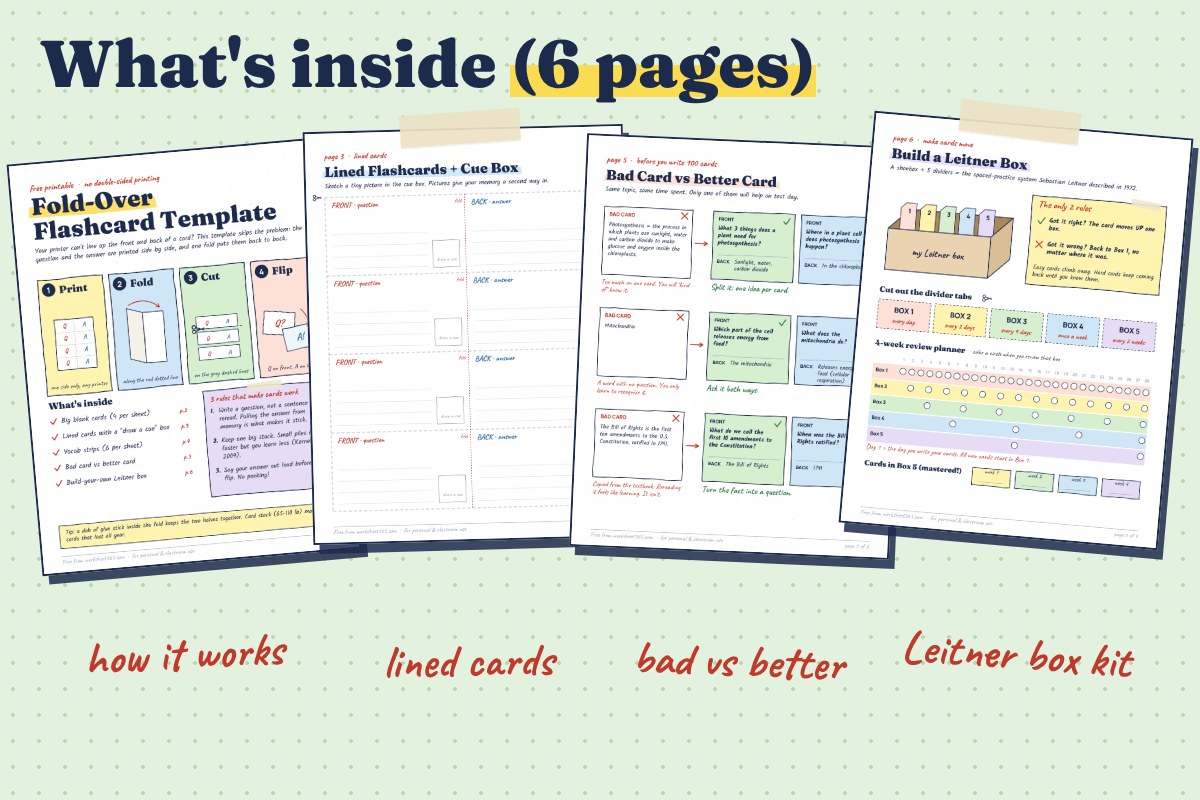
- Page 2, big blank cards: 4 per sheet, each about 3.75 × 2.2 inches once folded.
- Page 3, lined cards: with a small “draw a cue” box for a quick sketch.
- Page 4, vocab strips: 6 per sheet, with room for the meaning and your own sentence.
- Page 5, bad card vs better card: three real examples rewritten.
- Page 6, Leitner box kit: divider tabs to cut out and a 4-week review planner.
How to make fold-over flashcards
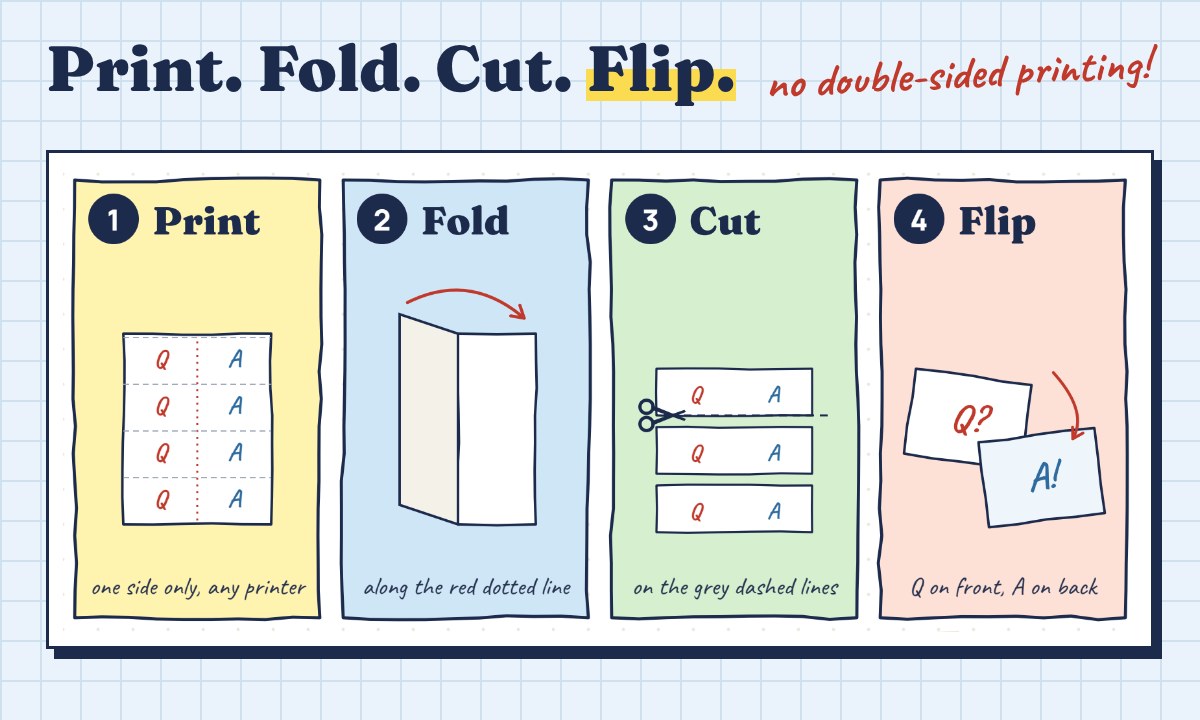
- Print on one side only. Any home or school printer works. Card stock gives sturdier cards, but plain paper is fine.
- Fill in your cards. Question on the left half, answer on the right half of the same row.
- Fold along the red dotted line, printed sides out. A dab of glue stick inside keeps the halves together.
- Cut on the grey dashed lines. Each strip becomes one card: question on the front, answer on the back.
Making flashcards in Word or Google Docs
Open the Word version, click on the grey “Type your question here” text and type over it. Each card is a table row, so a long answer simply wraps inside its own box. Print one-sided, then fold and cut like the PDF. In Google Docs, upload the file to Drive and choose Open with Google Docs. If you have a lot of cards, it’s faster to paste them into the Flashcard Maker at the top of this page: it lays them out four to a sheet for you.
What makes a good flashcard
A template only holds the cards. What’s written on them decides whether they work. The difference is simple: a good card makes you pull the answer out of your memory, a bad one only lets you reread it.
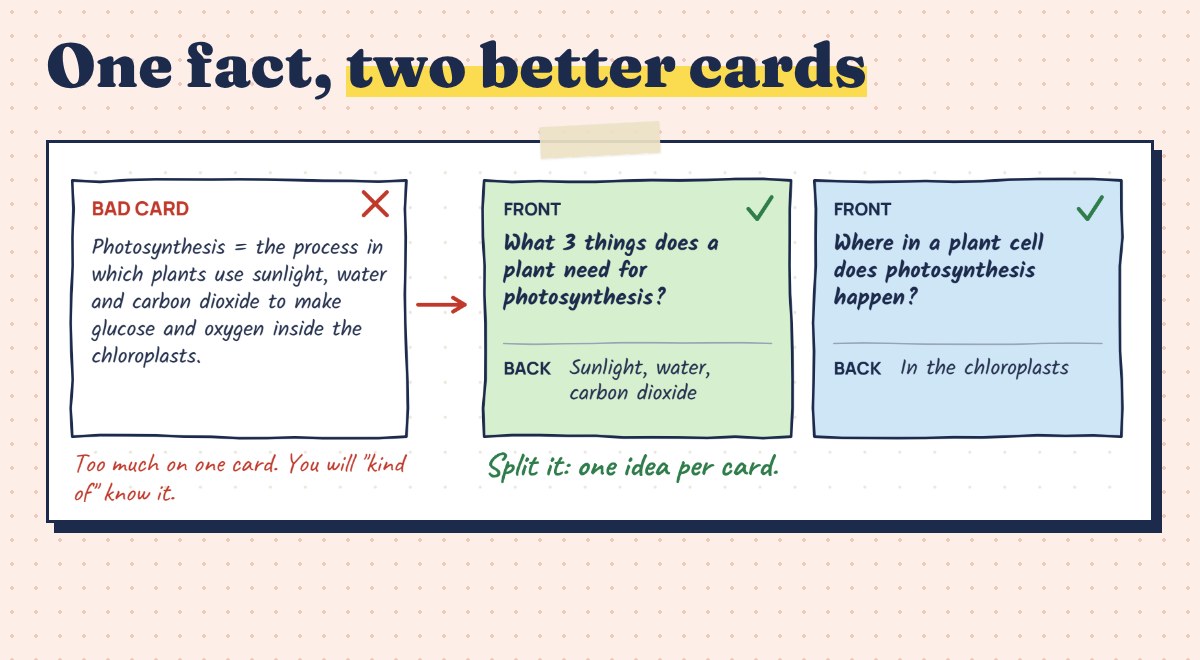
- Write a question, not a sentence. “What 3 things does a plant need for photosynthesis?” beats a copied definition. Answering from memory is what makes it stick: in a classic study, students who practiced recalling a text remembered 56% of it a week later, against 42% for students who reread it (Roediger & Karpicke, 2006).
- One idea per card. If the back has a whole paragraph, split it. You’ll “kind of” know a big card; you’ll actually know three small ones.
- Ask it both ways. “What does the mitochondria do?” and “Which part of the cell releases energy from food?” test the same fact from two directions.
- Use your own words, and add a tiny sketch. That’s what the cue box on page 3 is for.
Small piles feel faster. One big stack teaches more.
What Kornell (2009) found about flashcards
Keep one big stack
Most students split their cards into small piles and drill each pile until it feels easy. Psychologist Nate Kornell tested exactly that. Studying one large stack, where more time passes before each card comes back, beat several small stacks for 90% of participants. Yet after the first session, 72% believed the small stacks had worked better (Kornell, 2009, Applied Cognitive Psychology). The easy feeling is the trap: cards you just saw are easy to answer, so you think you know them.
Turn a shoebox into a Leitner box
Flashcards get much stronger when the easy ones stop taking up your time. In 1972, science journalist Sebastian Leitner described a simple way to do that with boxes (Leitner system). You need a shoebox and five dividers, both included as cut-outs on page 6 of the template.
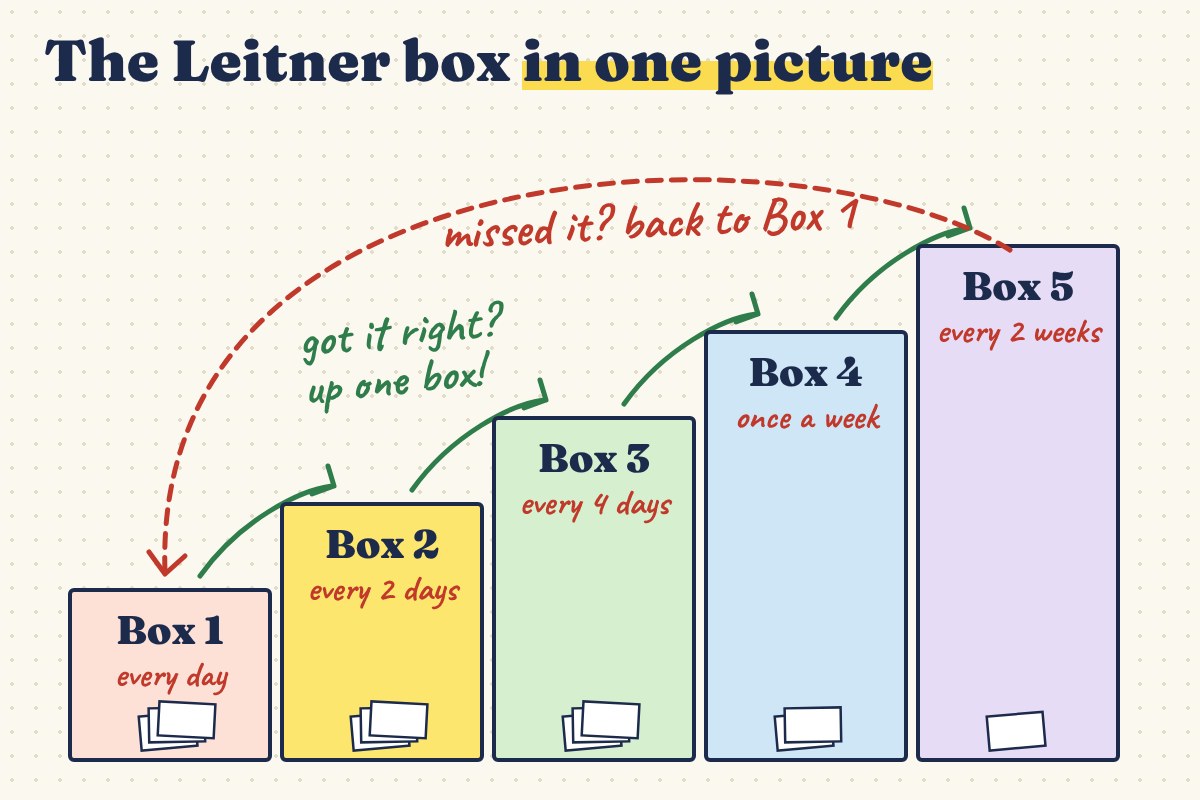
The rules fit on a sticky note. Every new card starts in Box 1. Answer it right and it moves up one box. Miss it and it goes back to Box 1, wherever it was. Then review each box on its own schedule. Here is a common one, the same as the planner on page 6:
| Box | Review it… | What’s inside |
|---|---|---|
| Box 1 | every day | new cards and cards you just missed |
| Box 2 | every 2 days | cards you got right once |
| Box 3 | every 4 days | getting there |
| Box 4 | once a week | almost known |
| Box 5 | every 2 weeks | mastered: just keep them fresh |
The Flashcard Maker at the top of this page runs the same five boxes on screen if you’d rather try it digitally first.
Paper flashcards or a flashcard app?
Both work when you answer before you flip and spread your reviews over several days. The format mostly decides what’s convenient:
| Paper (this template) | Flashcard app | |
|---|---|---|
| Writing the cards | by hand, which makes you rephrase | faster to type and edit |
| Spacing your reviews | you follow the Leitner planner | the app schedules for you |
| Distractions | none: no phone needed | notifications are one swipe away |
| Pictures and diagrams | quick sketches | images, sometimes audio |
| Cost | free to print | free plans with limits, paid upgrades |
If you’d like an app, our guide to Quizlet alternatives compares what each free plan actually includes. And if your cards come from class notes, the Cornell notes template gives you ready-made questions: the cue column turns straight into flashcard fronts.
What you need to make paper flashcards
- White card stock (65 to 110 lb): cards that survive a whole semester in a backpack.
- Binder rings: punch a corner and keep each box’s cards together.
- A glue stick: one dab inside the fold and the card won’t open.
- A shoebox for your Leitner box. Free, and probably already in your closet.
free download
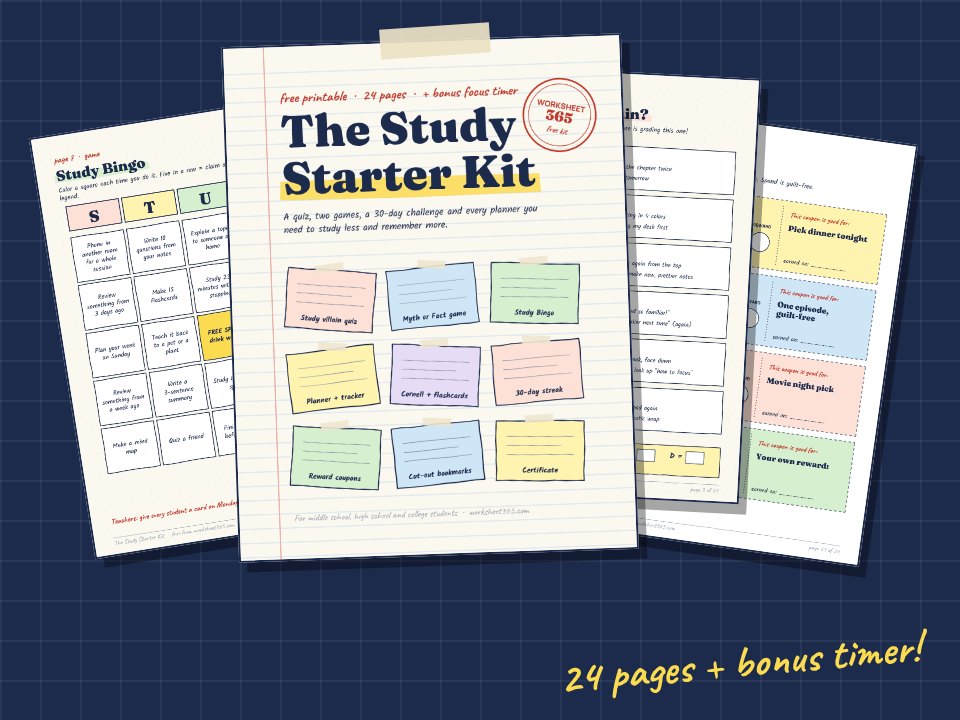
Get the 24-page Study Starter Kit
A study-villain quiz, Study Bingo, a 30-day streak challenge, planners and a bonus focus timer.
Send me the free kit →Frequently asked questions
How do I print double-sided flashcards that line up?
The easiest way is not to print double-sided at all. Many printers shift the back of the page by a few millimeters, so the answers drift off their cards. A fold-over template prints the question and the answer side by side on one side of the paper; folding the sheet puts them back to back, perfectly aligned.
What size is a standard flashcard?
The classic index card is 3 × 5 inches. Our fold-over cards are about 3.75 × 2.2 inches once folded, which fits four cards on one sheet of US Letter paper and still leaves room for a full question.
Can I edit the flashcard template in Word or Google Docs?
Yes. Download the Word version, click the grey placeholder text and type over it. For Google Docs, upload the file to Google Drive and open it with Google Docs. Print on one side, then fold and cut.
How many flashcards should I study a day?
There’s no magic number. What matters is spreading reviews over several days instead of cramming the night before. With a Leitner box, you review Box 1 every day and the other boxes on their schedule, so the daily pile stays small as cards move up.
Are paper flashcards better than apps?
Neither is better in itself. Both work when you answer from memory before you flip and space out your reviews. Paper helps if your phone distracts you or if writing by hand helps you rephrase. Apps help when you have hundreds of cards and want the schedule handled for you.
The bottom line
Good flashcards are short questions you answer out loud before you flip, studied in one big stack and spread over days. The fold-over template takes care of the printing problem, the Leitner box takes care of the schedule. Exam coming up? Our study schedule for exams turns those reviews into real dates on a calendar. Teaching vocabulary? Our free worksheet maker turns the same word list into matching, word search and fill-in-the-blank pages. All that’s left is writing the first card.
Our study skills workbooks on spaced practice and memory techniques are ready to print.