Teacher Grader App: Grade a Stack of Tests in Minutes
Gradlet is a teacher grader app: tap how many are wrong, get the score and letter grade, then print class reports with charts and stats.
It’s 9 p.m. You have 30 quizzes, a red pen and a paper grading chart, and you’re squinting at row 17 again. A teacher grader is supposed to make this fast. Gradlet makes it a single tap: tell it how many answers are wrong and the score and letter grade appear instantly. Then it keeps going. It saves every paper, works out the class average and prints a report with charts.
Quick answer: a teacher grader turns the number of wrong answers into a percentage and a letter grade. Gradlet is our teacher grader app for Android phones. It takes one tap per paper, works with any number of questions, handles half points, and turns every stack of tests into a class report you can print.
What is a teacher grader?
A teacher grader (also called an easy grader or a grading chart) is a lookup table that does one calculation for you:
score = (questions − wrong) ÷ questions × 100
Example: a 20-question quiz with 3 wrong answers is 17/20, which is 85%, a B on a 10-point scale. The paper chart works, but it only does that one thing. It can’t save the paper, average the class or tell you which students need a second look.
Meet Gradlet: one tap per paper
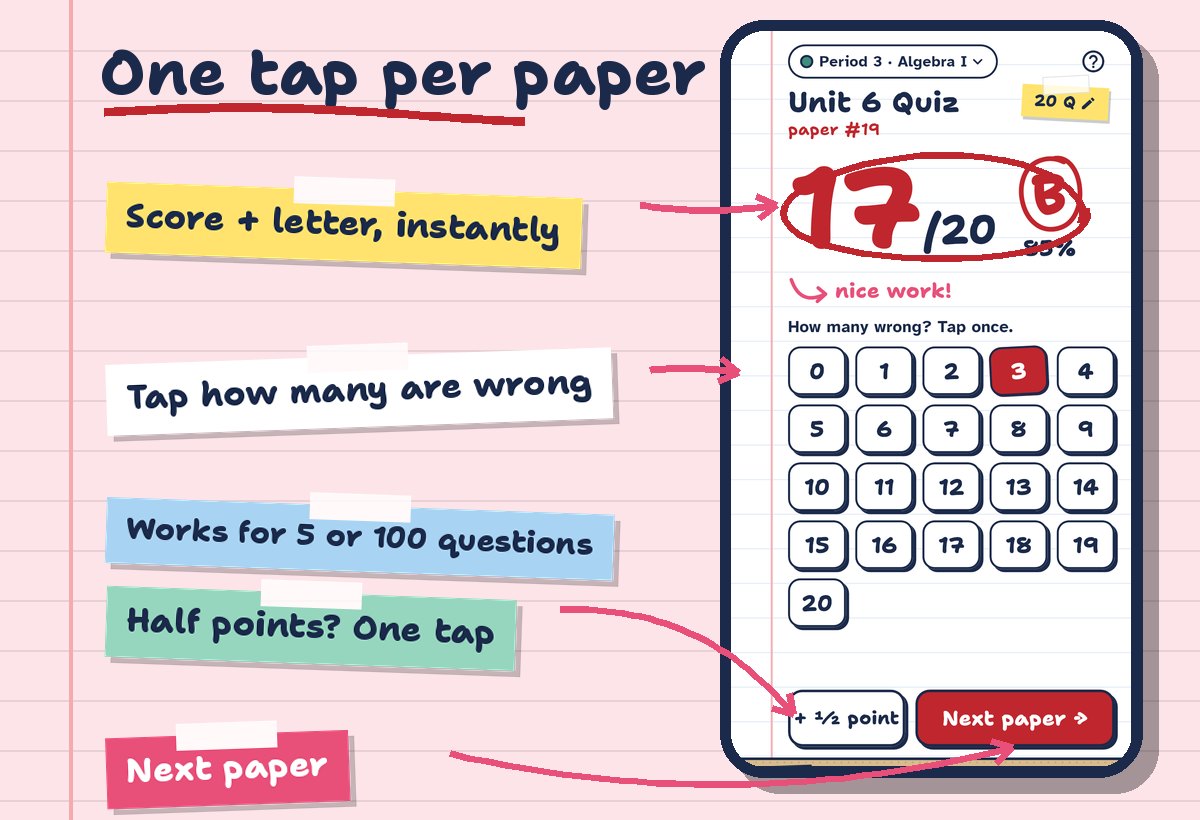
- Tap how many are wrong. The number pad matches your test, whether it has 10 questions or 100.
- The score and letter appear instantly, in big red ink, like you wrote them yourself.
- Half points? One tap on +½ point.
- Next paper. The paper number counts up for you.
How to grade a stack of tests with Gradlet
- Pick the class, for example Period 3 · Algebra I. Each class has its own color and subject.
- Name the test and set the number of questions.
- Tap the number wrong for each paper and add a half point if needed.
- Tap Done. The stack is saved in your gradebook and the class report is ready.
A stack of 30 papers takes a few minutes, because the only thing you do per paper is count the mistakes.
A grade chart with a letter on every row
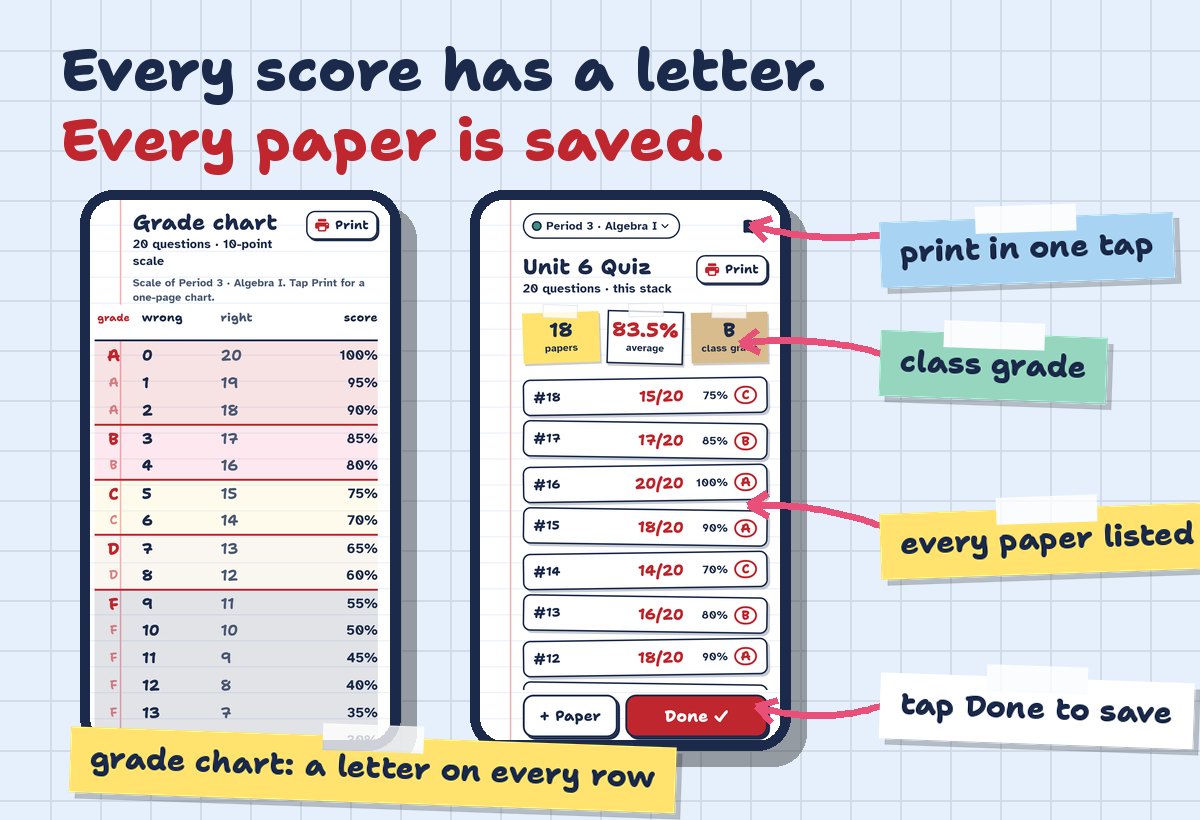
Prefer a classic teacher grader chart? Gradlet builds one for any number of questions, with the wrong count, right count, percentage and the letter on every row, colored by grade band. It follows your class’s grading scale, and you can print it on one page to keep on your desk.
Class reports and stats that write themselves
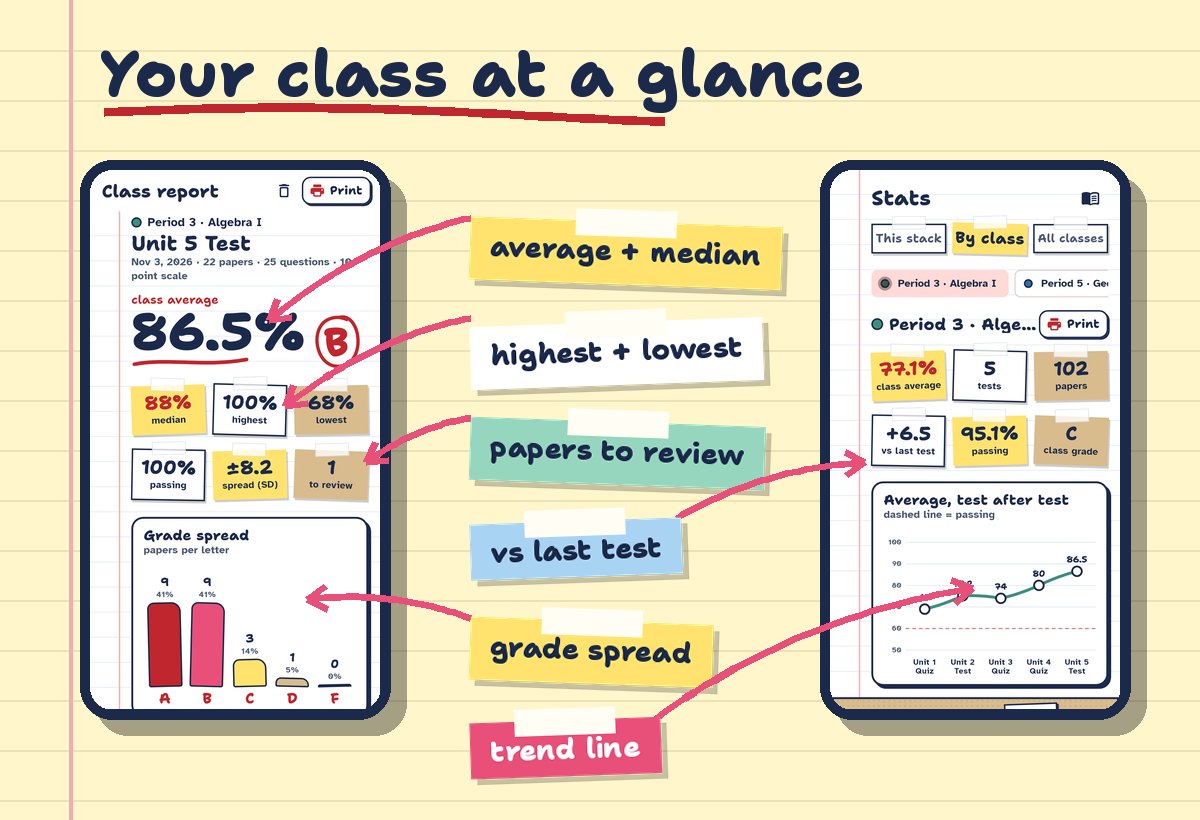
The moment you tap Done, Gradlet has already done the math you’d usually do on a calculator at the end of the night:
- Class average, median, highest and lowest, plus the spread (standard deviation).
- Passing rate and a grade spread chart (how many A, B, C, D and F).
- Papers to review: every D or F is listed, so you know who needs help.
- Trend line, test after test, and how much the class moved since the last test.
- All classes side by side, so you can compare Period 3 with Period 5.
Print it, share it, export it
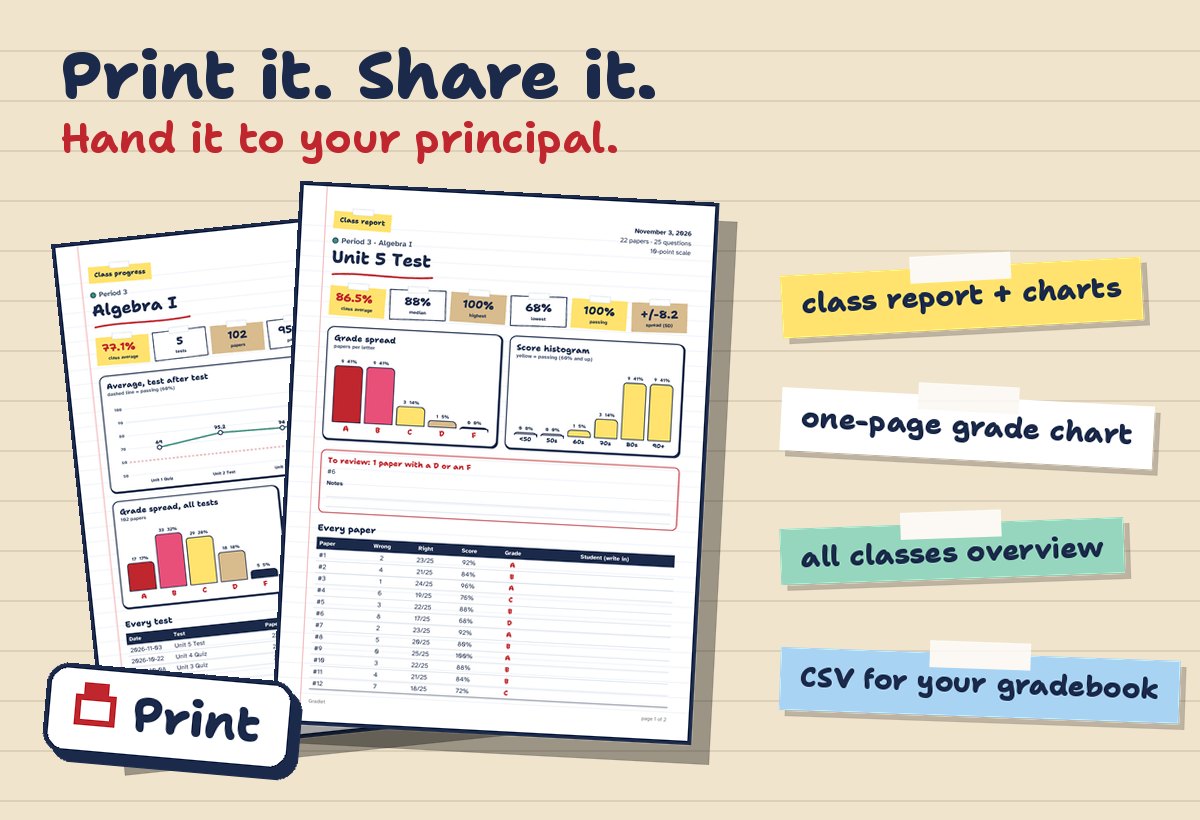
Every screen with numbers has a Print button. You get printouts that look like the app, with charts included: a class report, a one-page grade chart, a class progress page and an all-classes overview. Need the numbers in your school gradebook? Export a CSV in one tap.
Your grading scale, your way
- 10-point: A 90, B 80, C 70, D 60.
- With plus and minus: A−, B+ and the rest.
- 7-point: A 93, B 85, C 77, D 70.
- Custom: tap a letter and set where it starts.
Each class can have its own scale, so an honors class and a regular class are graded the way your school expects.
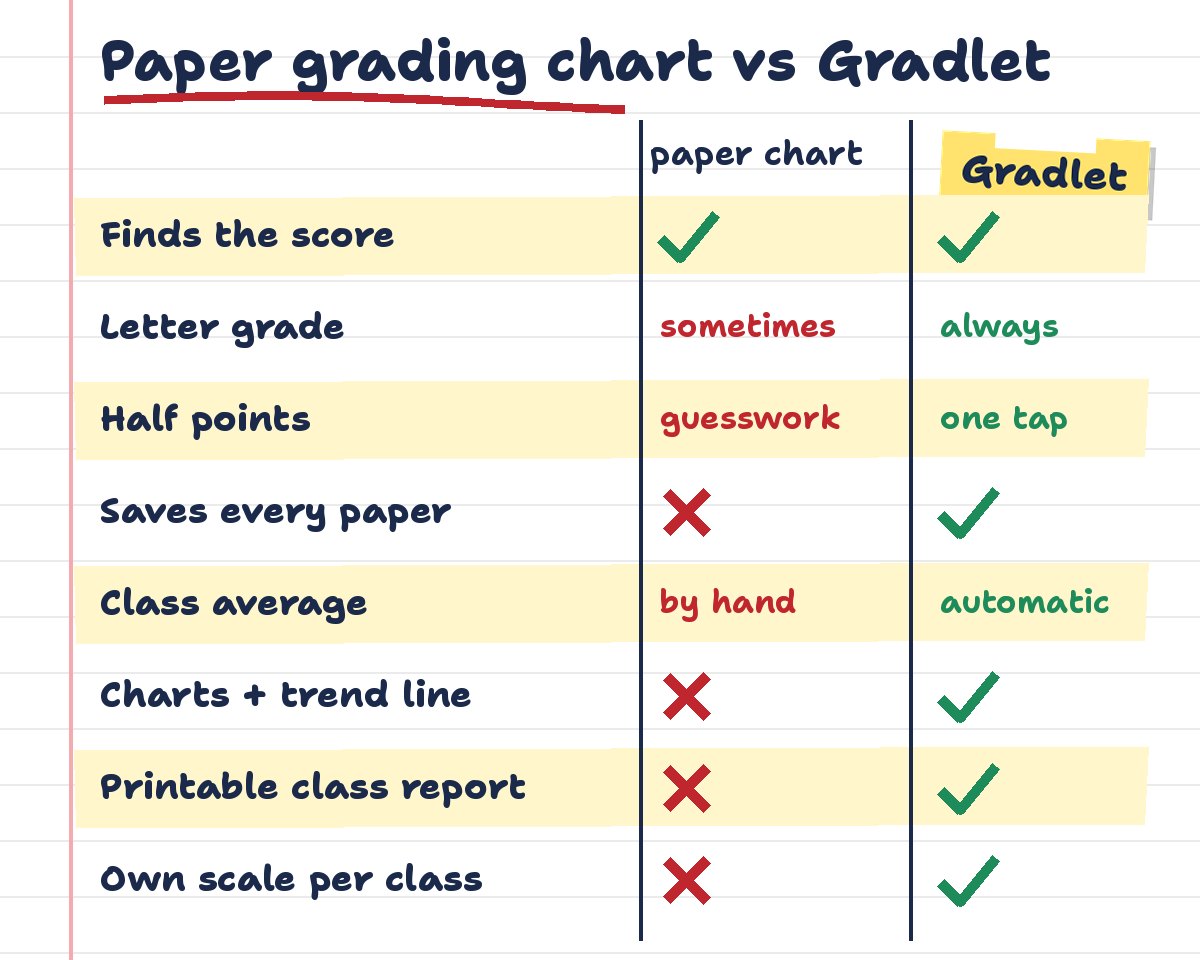
Paper grading chart vs Gradlet
FAQ
How does a teacher grader work?
It subtracts the wrong answers from the total, divides by the total and turns the result into a percentage and a letter. With Gradlet you only enter the number wrong; the app does the rest and saves the paper.
Can Gradlet handle half points?
Yes. Tap +½ point on any paper and the score, percentage and letter update right away.
Where are my grades stored?
On your phone. You don’t need student names: papers are numbered, and grading, charts and reports work without an internet connection. Details are in the Gradlet privacy policy.
Can I use a 7-point or custom grading scale?
Yes. Pick 10-point, plus/minus, 7-point or set your own cutoffs, and give each class a different scale if you need to.
Is Gradlet available on iPhone?
Not yet. Gradlet is an Android app on Google Play for now.
Planning review day after grading? See our list of games like Kahoot for the classroom.